
Tutorial in English and German / Anleitung in Englisch und Deutsch
English version:
In case you are into mixing Adobe programs, such as Photoshop and Illustrator, using SMART OBJECTS might be an option for you!
Placing Illustrator Images as Smart Objects into Photoshop CS6.
In two simple steps!
1. Open your Illustrator document with a simple Icon, Illustration or Logo.
2. Copy your Object and place it as Smart Object into Photoshop.
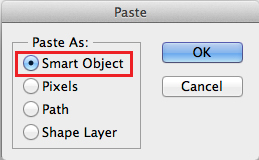
3. Click OK to confirm the placement. In the Layers you’ll find the Smart Oject as a small icon. By clicking on the small icon, the original file opens again in Illustrator.

If you make a change there and hit Save, the changes will be automatically transferred into your Photoshop Document because both programs are now connected.
Simple and Easy!

Deutsche Version:
Falls Sie gerne Adobe Programme – wie Photoshop und Illustrator – mischen…
View original post 127 more words
 i-adobe