Tutorial in English and German / Anleitung in Deutsch und Englisch
Deutsche Version siehe unten!

English version:
Would you like to receive our tips for free in your e-mail box? Simply select FOLLOW to sign up with your e-mail address.
TIP OF THE WEEK: Cool Illustrator Effects!
Did you ever try the cool Illustrator effects in CS6 or Creative Cloud?
1. Draw a small star or any simple shape you like
2. Go to MENU > EFFECT > DISTORT & TRANSFORM > TRANSFORM
3. Type in the numbers of your choice or use the same numbers as shown below
4. Click the Preview Button

5. Click OK, if you like the Preview

You want to change your effect? Simply go to MENU > WINDOW > APPEARANCE and click on Transform FX to open the same Effect-Window again.
To delete an effect; simply drag it to the trash can.
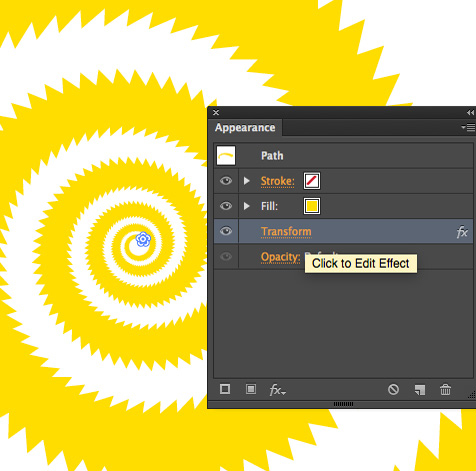
There are many effects you can try – since you can change them anytime with the APPEARANCE window, it’s really fun to try them all 🙂

TIP 2: additional tutorial for Adobe InDesign Effects: INDESIGN EFFECTS
Deutsche Version:
Möchten Sie unsere gratis Tipps in Ihrem e-mail erhalten? Schreiben Sie sich unter FOLLOW mit Ihrer e-mail Adresse ein.
TIPP DER WOCHE: Cool Illustrator Effekte!
Haben Sie jemals die coolen Illustrator Effekte in CS6 oder Creative Cloud ausprobiert?
1. Zeichnen Sie einen kleinen Stern oder Form nach Wunsch
2. Gehen Sie zu MENU > EFFEKT > VERZERRUNGS- UND TRANSFORMATIONSFILTER > TRANSFORMIEREN
3. Tippen Sie Ihre Nummern ein oder nehmen die gleichen wie unten im Bild
4. Klicken Sie auf Vorschau

5. Klicken Sie OK, wenn Ihnen die Vorschau gefällt
Möchten Sie Ihren Effekt ändern? Gehen Sie zu MENU > FENSTER > AUSSEHEN und klicken Sie auf Transformieren FX um dasselbe Effekte-Bedienfeld wieder zu öffnen und Änderungen vorzunehmen.
Mit dem Auge können Sie den Effekt temporär ausschalten und den Effekt ganz löschen ist einfach; klicken Sie auf den Papierkorb.
Mit dem Aussehen-Bedienfeld können Sie jeden Effekt modifizieren oder löschen.
Dies betrifft auch 3-D Effekte, Schlagschätten usw.

Es gibt endlos viele Effekte – da Sie diese jederzeit löschen oder ändern können, macht es Spass so viele wie möglich auszuprobieren 🙂
TIPP 2: Zusätzliche Anleitung für Adobe InDesign Effekte: INDESIGN EFFEKTE


 i-adobe