
Deutsche Version siehe unten!
My personal tip: I love to work with RGB in Photoshop, as shown on my Illustration below. I prefer RGB since it has millions of colors to choose from. Either sRGB or Adobe RGB depending on the project. (see animation below)
When converting to CMYK you can go to IMAGE > MODE. The professional method to convert a RGB file into CMYK would be: Photoshop > Menu > Edit > Convert to Profile and select the CMYK color profile of your choice. (To find out which CMYK color profile is correct for your project, depends on the printing press and the chosen paper.) Nevertheless, it’s important to know that CMYK files have only a range of approx. 4000 – 6000 colors used for the printing process, so it is better for me to keep the PSD file with layers in RGB and convert a flatten Tiff-Copy to CMYK.
More on the RGB-topic: RGB versus S-RGB
ALL tips of this Blog combined in one 72 pages PDF for easy download: i-adobe book in English – Preview & download here
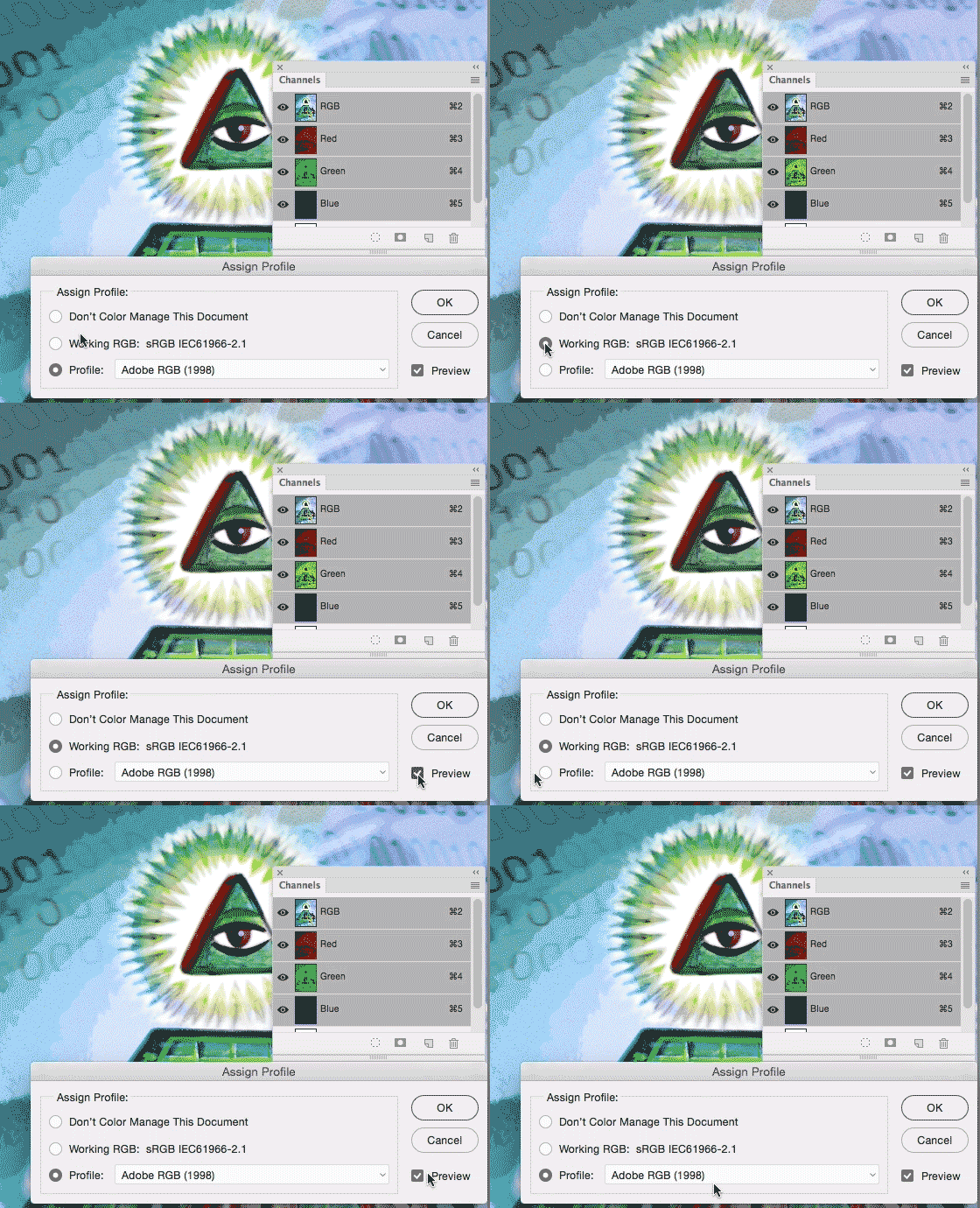
Photoshop > Menu > Edit > Assign Profiles: Shows difference of sRGB to Adobe RGB / Photoshop > Menu > Bearbeiten > Profile zuweisen: zeigt Unterschied von sRGB zu Adobe RGB
Deutsche Version
Mein persönlicher Tipp: Ich arbeite am liebsten mit RGB in Photoshop, wie man unten bei meiner Illustration sehen kann. Ich bevorzuge RGB da es Millionen von Farbmöglichkeiten hat, je nach Projekt wähle ich sRGB oder Adobe RGB. (Siehe Animation oben)
Wenn man sein Bild in CMYK konvertieren will, kann man unter BILD > MODUS das CMYK Fogra 39 Farbprofil wählen. Die professionelle Methode wäre jedoch: Photoshop > Menu > Bearbeiten > in Profil umwandeln und wähle dort das korrekte CMYK Farbprofil. (welches Farbprofil korrekt ist, hängt von der Druckmachine und Papierwahl ab; download Farbprofile www.eci.org). Es ist wichtig nicht zu vergessen, dass CMYK Dokumente nur ca. 4000 – 6000 Farbmöglichkeiten haben, da dieser Modus für die Offsetdruckmaschine auf Papier gedacht ist, d.h. ich persönlich behalte meine PSD Datei in RBG (mit Ebenen) und speichere eine Tiff-Kopie (ohne Ebenen) welches ich in das gewünschte CMYK Farbprofil umwandle.
Mehr über das Thema RGB oder s-RGB: RGB versus S-RGB
Alle Tipps von diesem Blog kombiniert in einem 72-Seiten PDF zum herunterladen: i-adobe book in Deutsch – Vorschau & Download hier

Courtesy of Illustration Source
View the artists’s homage on the topic: MONEY
Miriam Selmi Reed is represented by Illustration Source, New York City. Portfolio and contact: Illustration Source NYC
Illustration technique: watercolor, acrylic and pencil combined with digital mixed media using Adobe Photoshop and Illustrator.Copyright by Illustration Source, New York City.
Illustrations-Technik: Aquarell, Acryl mit Farbstift, gemischt mit Adobe Photoshop und Illustrator. Copyright by Illustration Source, New York City.
Your source for commissioned illustration: ORIGINAL ART STUDIOS in New York City.

Portfolio Original Art Studios, New York City: MIRIAM SELMI REED

 i-adobe