Drawing / Zeichnen “the easy way” !

Deutsche Version siehe unten!
Drawing is easy! I love drawing with the pen tool in Adobe Illustrator, as shown in my Illustration below. I use a simple “click n’drag technique” which allows me to control each anchor point.
Step-by-step guide on how to “Draw-your-own-Comic” for advanced Adobe users: COMIC-DRAWING with Adobe Illustrator.
ALL tips of this Blog combined in one 72 pages PD F for easy download: i-adobe book in English – Preview & download here
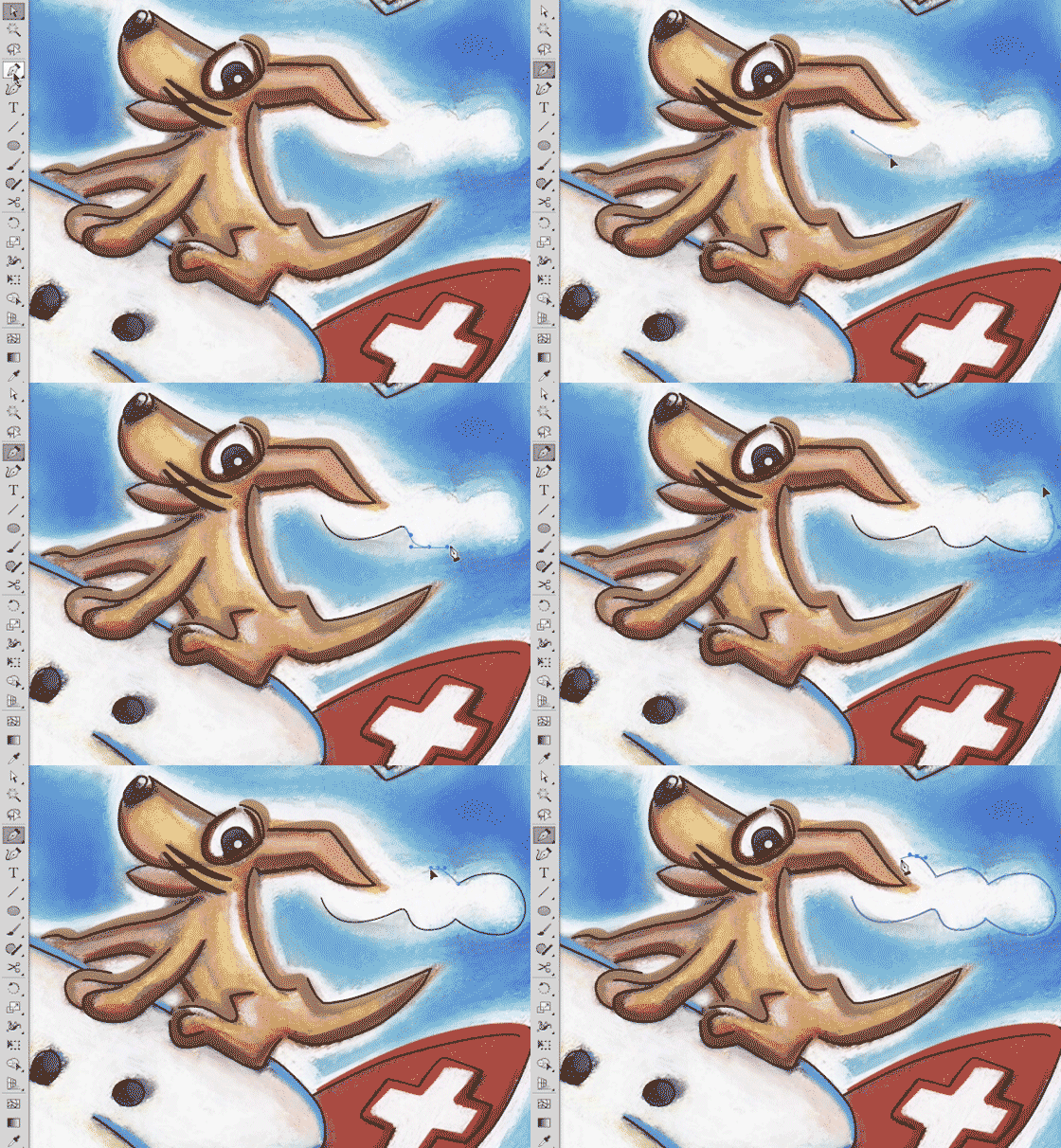
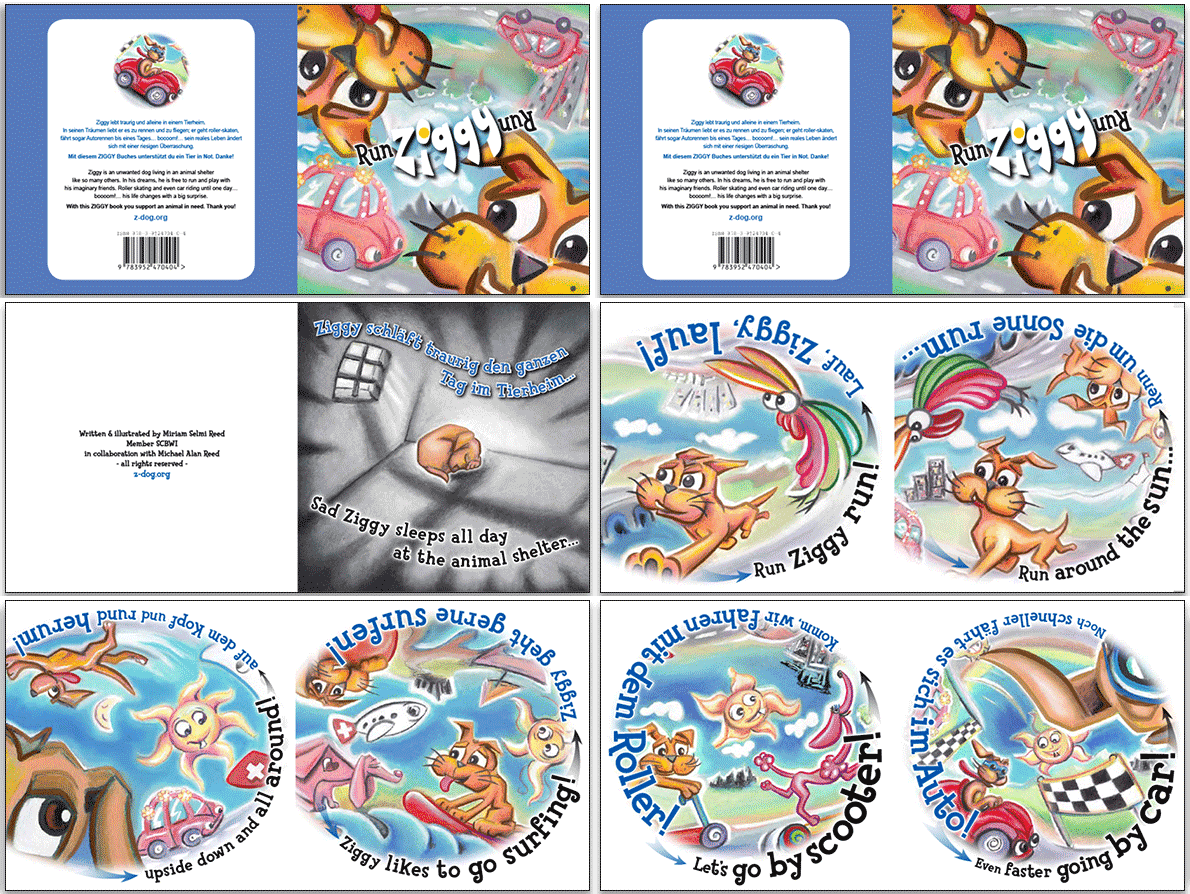
Comic illustration by Miriam Selmi Reed for ZIGGY- books. All rights reserved.

Comic illustration by Miriam Selmi Reed for ZIGGY- books. All rights reserved.

Deutsche Version
Zeichnen ist super einfach! Ich zeichne mit dem Zeichenstift-Werkzeug in Adobe Illustrator mit meiner “klick-ziehen-Methode” um jeden Ankerpunkt zu kontrollieren, wie ich oben bei meiner Illustration zeige.
“Zeichne deinen eigenen Comic Workshop” – Für fortgeschrittene Adobe BenutzerInnen: COMIC-ZEICHNEN mit Adobe Illustrator.
Alle Tipps von diesem Blog kombiniert in einem 72-Seiten PDF zum herunterladen: i-adobe book in Deutsch – Vorschau & Download hier

divider

Run ZIGGY Run bilingual Comic for kids / zweisprachiger Comic für Kinder: ISBN 978-3-9524704-0-4
International store: RUN ZIGGY RUN International Store (6 Euro go to animal rescue / 6 Euro gehen in den Tierschutz)

Store in Germany: HUGENDUBEL Deutschland (2 Euro per book sale go to animal rescue / 2 Euro pro Buchverkauf gehen in den Tierschutz)

Store in Switzerland: EX LIBRIS, Schweiz (2 CHF per book sale go to animal rescue / 2 CHF pro Buchverkauf gehen in den Tierschutz)
SCAN !

divider

Deutsche Version siehe unten!
Scan Tip: I love to scan my drawings and open them in Adobe Photoshop, as shown on my Illustration below. I use a simple scanner and use a high dpi setting. In Adobe Photoshop I use LAYERS > as well as TRANSPARANCIES so I can paint on a layer on top of my scan, working non-destructive. I also use mostly LAYER MASKS when I have to erase parts of my work. I simply avoid destructive methods like the “eraser tool”!
Step-by-step guide for layer masks: LAYER MASKS in Adobe Photoshop.
ALL tips of this Blog combined in one 72 pages PDF for easy download: i-adobe book in English – Preview & download here

Deutsche Version
Scan Tipp: Ich scanne meine Zeichnungen gerne ein und öffne sie in Adobe Photoshop, wie ich unten bei meiner Illustration zeige. Ich benutze einen normalen Scanner mit einer hohen DPI Einstellung. In Adobe Photoshop benutze ich EBENEN > und TRANSPARENZEN damit ich auf der Ebene oberhalb meines Scans nicht-destruktiv arbeiten kann. Ich benutze zudem immer EBENENMASKEN wenn ich Teile meines Bilder löschen möchte. Ich vermeide prinzipiell das “Radiergummi-Werkzeug” welches Pixel unwiderruflich löscht!
Hier sind die Arbeitsschritte dazu: EBENEN-MASKEN in Adobe Photoshop.
Alle Tipps von diesem Blog kombiniert in einem 72-Seiten PDF zum herunterladen: i-adobe book in Deutsch – Vorschau & Download hier

divider

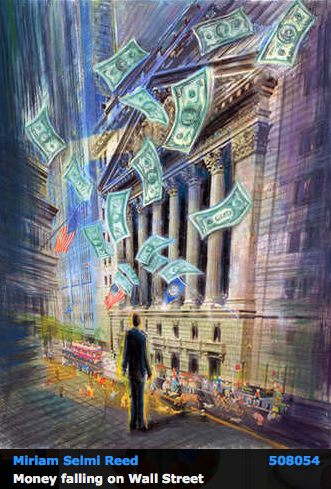
Courtesy of Illustration Source

Courtesy of Illustration Source

View the artists’s homage on the topic: WALL STREET

Miriam Selmi Reed is represented by Illustration Source, New York City. Portfolio and contact: Illustration Source NYC

Illustration technique: watercolor, acrylic and pencil combined with digital mixed media using Adobe Photoshop and Illustrator.Copyright by Illustration Source, New York City.

Illustrations-Technik: Aquarell, Acryl mit Farbstift, gemischt mit Adobe Photoshop und Illustrator. Copyright by Illustration Source, New York City.

divider

Your source for commissioned illustration: ORIGINAL ART STUDIOS in New York City.

OAS

Portfolio Original Art Studios, New York City: MIRIAM SELMI REED

RUN ZIGGY RUN – Happy Holidays everyone!

Our bilingual RUN ZIGGY RUN Book; the perfect gift for kids / With this ZIGGY book you support an animal in need. Thank you!
Unser zweisprachiges RUN ZIGGY RUN Buch; Das perfekte Geschenk für Kinder / mit diesem ZIGGY Buch unterstützt du ein Tier in Not. Danke!

Store in Germany: RUN ZIGGY RUN – HUGENDUBEL Germany

Store in Switzerland: RUN ZIGGY RUN – EXLIBRIS, Switzerland

Secure store with international shipping: RUN ZIGGY RUN – International Store

z-dog_animation1

RUN ZIGGY RUN
Bilingual German/English ZIGGY books are 2 language Turn-2-Learn reading adventures for kids 3 to 8 years old!
36 pages in color, 6.75 x 6,75″ / REEDAROUND Books, ISBN: 978-3-9524704-0-4

Zweisprachige Deutsch/Englisch ZIGGY-Bücher sind ein Drehen-zum-Lernen Abenteuer für Kinder von 3 bis 8 Jahre alt! 36 Seiten in Farbe, 17 x 17 cm / ISBN: 978-3-9524704-0-4

runziggyrun-small1

NEWS: RUN ZIGGY RUN books for sale at the children’s book store in Zurich, Switzerland, Oberdorfstrasse 32! and the Scheidegger Bookstore in Affoltern am Albis.

kinderbuchladen

ZIGGY’s BLOG: with films, animations and more: Have fun!

Languages in Adobe InDesign / Sprachen in Adobe InDesign

Deutsche Version siehe unten!
TIP OF THE MONTH:
“How to change the languages in Adobe InDesign”:

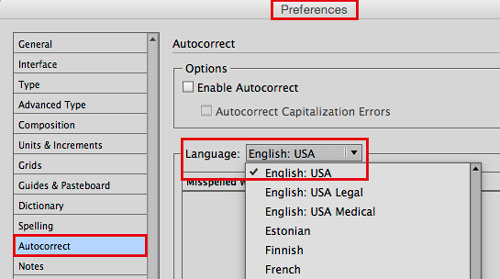
To avoid problems with languages in InDesign, it is crucial to make sure that the language you have chosen is THE SAME in the Preferences AND in the font settings!

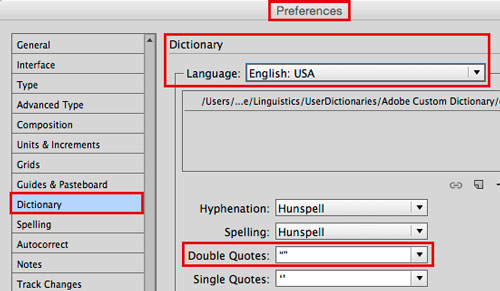
1. Open InDesign and go to MENU > EDIT > PREFERENCES and make the following selections:
(Mac: INDESIGN > PREFERENCES) – The settings below are for ENGLISH USA:

pref1

pref2

It is VERY important to choose the same language in the Characters:
charac

Same goes IF you are using a Paragraph or Character Style:
para

Now when you import or place your Word document; Indesign will recognise your settings!

Additional Tip: How to import a large word doc into InDesign

ALL tips combined in one PDF: i-adobe book in English – Preview & download here

divider

Deutsche Version
TIPP DES MONATS:
“Wie man die Spracheinstellungen in Adobe InDesign korrekt einstellt”:

Um Konflikte mit verschiedenen Sprachen zu vermeiden ist es WICHTIG, dass man dieselbe Spracheinstellung in den Voreinstellungen UND in den Zeichenformatierung oder Zeichen-Absatzformate wählt:

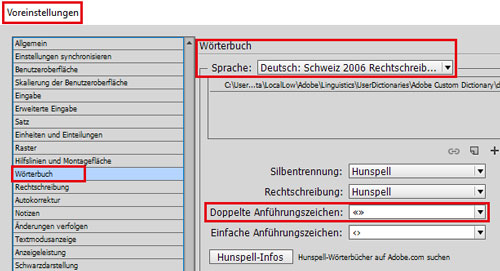
1. Öffne InDesign und gehe zu MENU > BEARBEITEN > VOREINSTELLUNGEN:
(Mac: INDESIGN > VOREINSTELLUNGEN) – Diese Einstellungen sind für die Schweiz:

vorein1

vorein2

Es ist SEHR WICHTIG die gleiche Sprache in der Zeichenformatierung zu wählen:
vorein3

Dasselbe gilt natürlich wenn man Zeichen- oder Absatzformat verwendet:
vorein4

Beim importieren oder platzieren eines Word Dokuments werden somit diese Einstellungen korrekt umgesetzt – zudem funktioniert die Autokorrektur damit besser.

Weiterer Tipp: Wie man ein grosses Word Doc ins InDesign platziert

Alle Tipps kombiniert in einem PDF: i-adobe book in Deutsch – Vorschau & Download hier