RGB or CMYK ?

divider

Deutsche Version siehe unten!
My personal tip: I love to work with RGB in Photoshop, as shown on my Illustration below. I prefer RGB since it has millions of colors to choose from. Either sRGB or Adobe RGB depending on the project. (see animation below)

When converting to CMYK you can go to IMAGE > MODE. The professional method to convert a RGB file into CMYK would be: Photoshop > Menu > Edit > Convert to Profile and select the CMYK color profile of your choice. (To find out which CMYK color profile is correct for your project, depends on the printing press and the chosen paper.) Nevertheless, it’s important to know that CMYK files have only a range of approx. 4000 – 6000 colors used for the printing process, so it is better for me to keep the PSD file with layers in RGB and convert a flatten Tiff-Copy to CMYK.
More on the RGB-topic: RGB versus S-RGB
ALL tips of this Blog combined in one 72 pages PDF for easy download: i-adobe book in English – Preview & download here
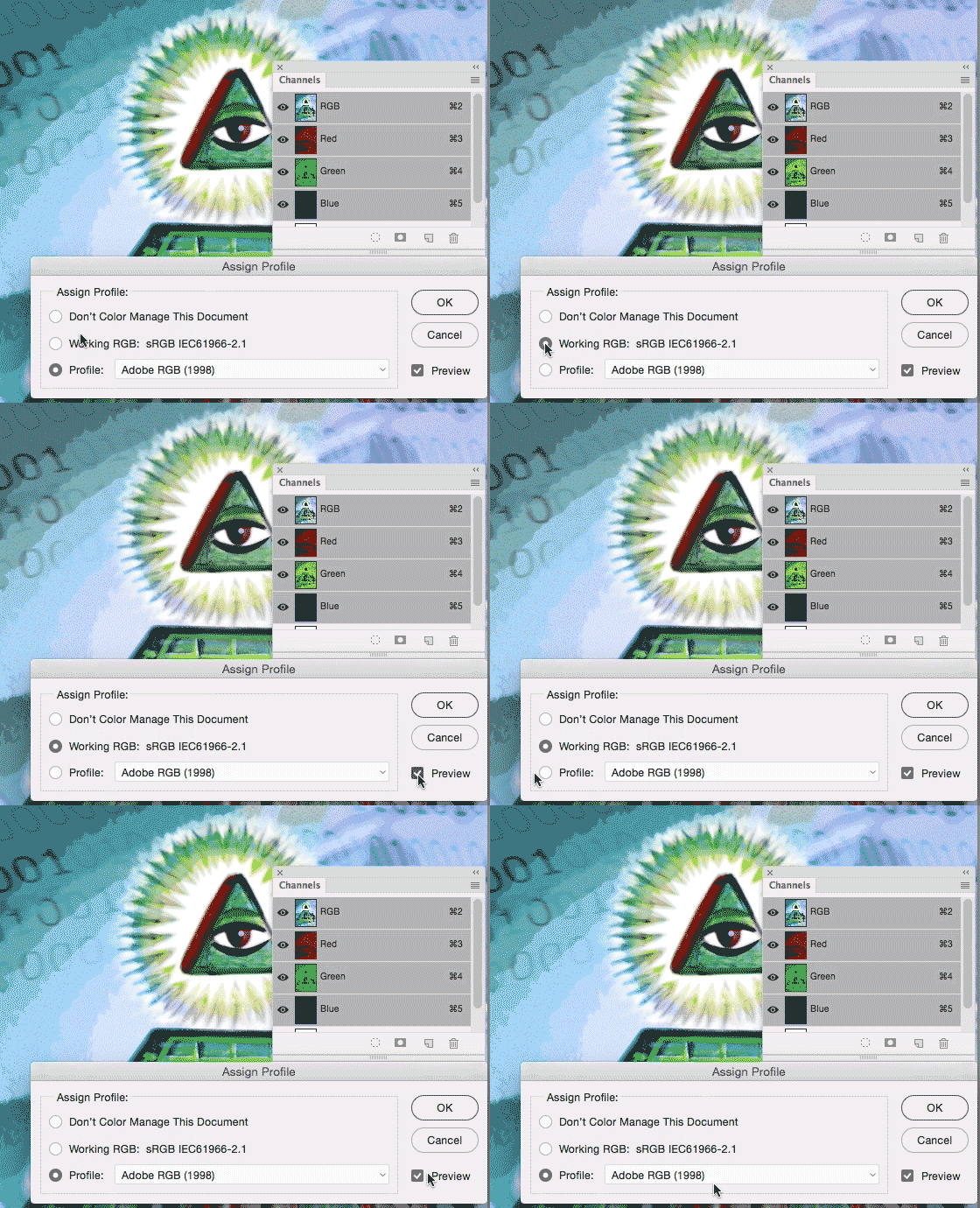
Shows sample of sRGB and Adobe RGB / zeigt Beispiel von sRGB und Adobe RGB

Photoshop > Menu > Edit > Assign Profiles: Shows difference of sRGB to Adobe RGB / Photoshop > Menu > Bearbeiten > Profile zuweisen: zeigt Unterschied von sRGB zu Adobe RGB

Deutsche Version
Mein persönlicher Tipp: Ich arbeite am liebsten mit RGB in Photoshop, wie man unten bei meiner Illustration sehen kann. Ich bevorzuge RGB da es Millionen von Farbmöglichkeiten hat, je nach Projekt wähle ich sRGB oder Adobe RGB. (Siehe Animation oben)

Wenn man sein Bild in CMYK konvertieren will, kann man unter BILD > MODUS das CMYK Fogra 39 Farbprofil wählen. Die professionelle Methode wäre jedoch: Photoshop > Menu > Bearbeiten > in Profil umwandeln und wähle dort das korrekte CMYK Farbprofil. (welches Farbprofil korrekt ist, hängt von der Druckmachine und Papierwahl ab; download Farbprofile www.eci.org). Es ist wichtig nicht zu vergessen, dass CMYK Dokumente nur ca. 4000 – 6000 Farbmöglichkeiten haben, da dieser Modus für die Offsetdruckmaschine auf Papier gedacht ist, d.h. ich persönlich behalte meine PSD Datei in RBG (mit Ebenen) und speichere eine Tiff-Kopie (ohne Ebenen) welches ich in das gewünschte CMYK Farbprofil umwandle.
Mehr über das Thema RGB oder s-RGB: RGB versus S-RGB
Alle Tipps von diesem Blog kombiniert in einem 72-Seiten PDF zum herunterladen: i-adobe book in Deutsch – Vorschau & Download hier

divider

Courtesy of Illustration Source

Courtesy of Illustration Source

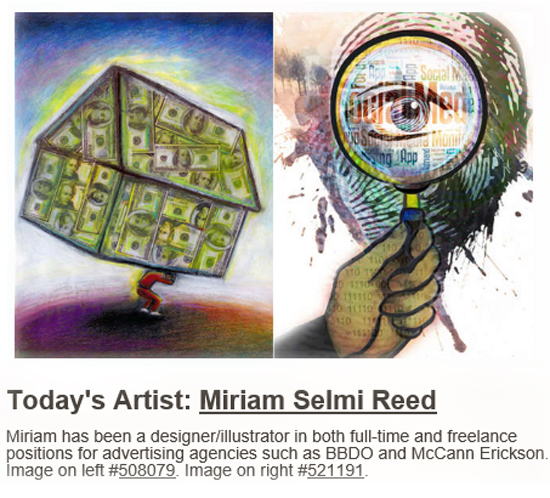
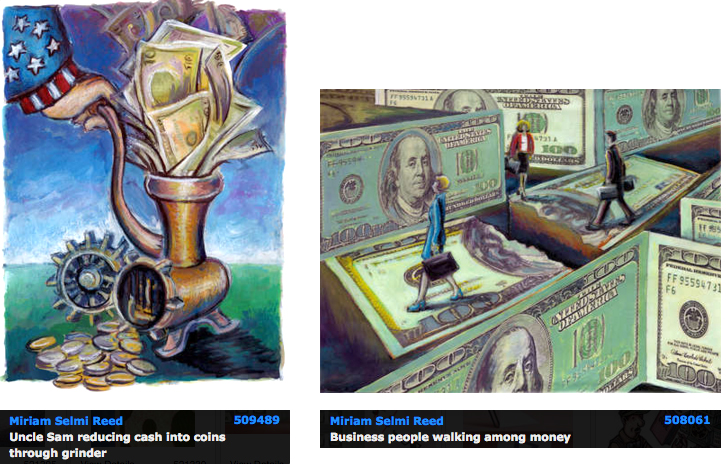
View the artists’s homage on the topic: MONEY

Miriam Selmi Reed is represented by Illustration Source, New York City. Portfolio and contact: Illustration Source NYC

Illustration technique: watercolor, acrylic and pencil combined with digital mixed media using Adobe Photoshop and Illustrator.Copyright by Illustration Source, New York City.

Illustrations-Technik: Aquarell, Acryl mit Farbstift, gemischt mit Adobe Photoshop und Illustrator. Copyright by Illustration Source, New York City.

divider

Your source for commissioned illustration: ORIGINAL ART STUDIOS in New York City.

OAS

Portfolio Original Art Studios, New York City: MIRIAM SELMI REED
Get creative in 2017!

divider

Deutsche Version siehe unten!
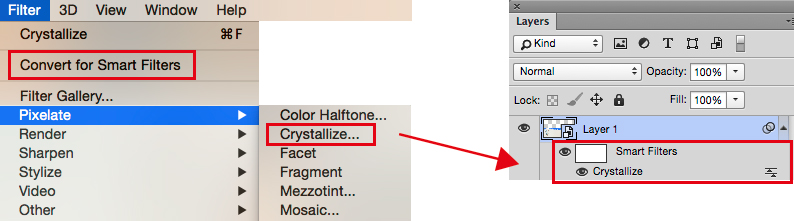
Photoshop Tipp > SMART FILTERS: When I’m using Filters in Adobe Photoshop as shown on my Illustration below, I first go under MENU > FILTER > Convert for Smart Filters. With this method, I can apply every filter and work non-destructive. I open my layers and click on my Smart-Filter-icon which opens the previous chosen filter settings so I can make my adjustments.
More tipps on how to work with SMART OBJECTS : COMBINE Adobe Illustrator with Photoshop!
ALL tips of this Blog combined in one 72 pages PDF for easy download: i-adobe book in English – Preview & download here

smart-filters

Deutsche Version
Photoshop Tip > SMART FILTER: Wenn ich in Adobe Photoshop Filter benutze – siehe unten – dann gehe ich unter MENU > FILTER > Konvertieren für Smart Filter. Mit dieser Methode arbeite ich nicht-Destruktiv , und kann somit jeden Filter löschen oder nach Wunsch verändern. Dazu öffne ich mein Ebenen-Bedienfeld und klicke auf meinen Smart-Filter-Icon, damit sich der vorher gewählte Filter wieder öffnet und ich Änderungen vornehmen kann.
Mehr Tipps wie man mit SMART OBJEKTEN arbeitet : kombiniere Adobe Illustrator mit Photoshop!
Alle Tipps von diesem Blog kombiniert in einem 72-Seiten PDF zum herunterladen: i-adobe book in Deutsch – Vorschau & Download hier

divider

ARTIST OF THE MONTH – SIS in NYC:

Courtesy of Illustration Source

Courtesy of Illustration Source

Miriam Selmi Reed is represented by Illustration Source, New York City. Portfolio and contact: Illustration Source NYC

Illustration technique: watercolor, acrylic and pencil combined with digital mixed media using Adobe Photoshop and Illustrator.Copyright by Illustration Source, New York City.

Illustrations-Technik: Aquarell, Acryl mit Farbstift, gemischt mit Adobe Photoshop und Illustrator. Copyright by Illustration Source, New York City.

View the SIS artists’s homage on the topic: New Beginnings!

Drawing / Zeichnen “the easy way” !

Deutsche Version siehe unten!
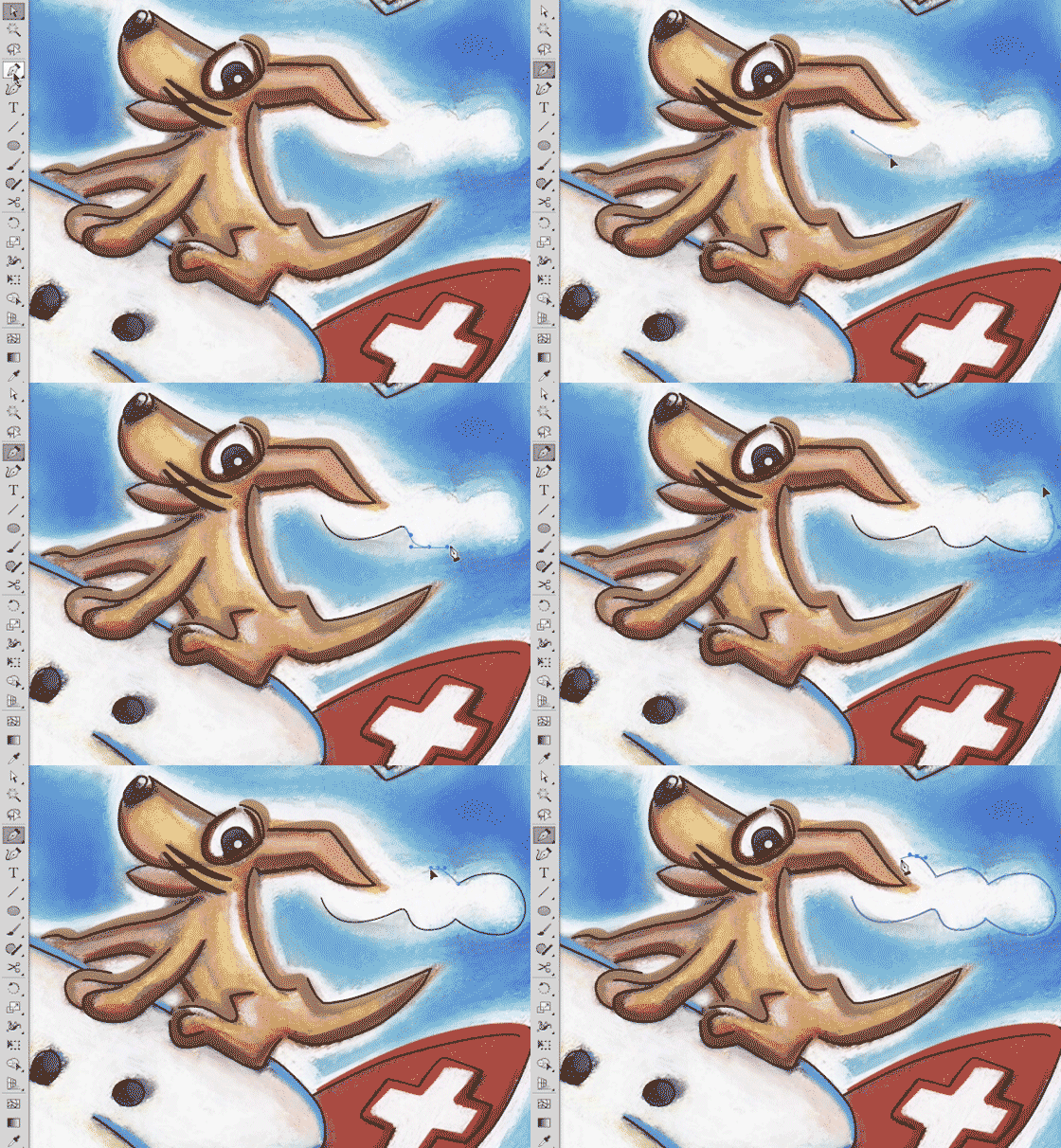
Drawing is easy! I love drawing with the pen tool in Adobe Illustrator, as shown in my Illustration below. I use a simple “click n’drag technique” which allows me to control each anchor point.
Step-by-step guide on how to “Draw-your-own-Comic” for advanced Adobe users: COMIC-DRAWING with Adobe Illustrator.
ALL tips of this Blog combined in one 72 pages PD F for easy download: i-adobe book in English – Preview & download here

Comic illustration by Miriam Selmi Reed for ZIGGY- books. All rights reserved.

Comic illustration by Miriam Selmi Reed for ZIGGY- books. All rights reserved.

Deutsche Version
Zeichnen ist super einfach! Ich zeichne mit dem Zeichenstift-Werkzeug in Adobe Illustrator mit meiner “klick-ziehen-Methode” um jeden Ankerpunkt zu kontrollieren, wie ich oben bei meiner Illustration zeige.
“Zeichne deinen eigenen Comic Workshop” – Für fortgeschrittene Adobe BenutzerInnen: COMIC-ZEICHNEN mit Adobe Illustrator.
Alle Tipps von diesem Blog kombiniert in einem 72-Seiten PDF zum herunterladen: i-adobe book in Deutsch – Vorschau & Download hier

divider

Run ZIGGY Run bilingual Comic for kids / zweisprachiger Comic für Kinder: ISBN 978-3-9524704-0-4
International store: RUN ZIGGY RUN International Store (6 Euro go to animal rescue / 6 Euro gehen in den Tierschutz)

Store in Germany: HUGENDUBEL Deutschland (2 Euro per book sale go to animal rescue / 2 Euro pro Buchverkauf gehen in den Tierschutz)

Store in Switzerland: EX LIBRIS, Schweiz (2 CHF per book sale go to animal rescue / 2 CHF pro Buchverkauf gehen in den Tierschutz)

SCAN !

divider

Deutsche Version siehe unten!
Scan Tip: I love to scan my drawings and open them in Adobe Photoshop, as shown on my Illustration below. I use a simple scanner and use a high dpi setting. In Adobe Photoshop I use LAYERS > as well as TRANSPARANCIES so I can paint on a layer on top of my scan, working non-destructive. I also use mostly LAYER MASKS when I have to erase parts of my work. I simply avoid destructive methods like the “eraser tool”!
Step-by-step guide for layer masks: LAYER MASKS in Adobe Photoshop.
ALL tips of this Blog combined in one 72 pages PDF for easy download: i-adobe book in English – Preview & download here

Deutsche Version
Scan Tipp: Ich scanne meine Zeichnungen gerne ein und öffne sie in Adobe Photoshop, wie ich unten bei meiner Illustration zeige. Ich benutze einen normalen Scanner mit einer hohen DPI Einstellung. In Adobe Photoshop benutze ich EBENEN > und TRANSPARENZEN damit ich auf der Ebene oberhalb meines Scans nicht-destruktiv arbeiten kann. Ich benutze zudem immer EBENENMASKEN wenn ich Teile meines Bilder löschen möchte. Ich vermeide prinzipiell das “Radiergummi-Werkzeug” welches Pixel unwiderruflich löscht!
Hier sind die Arbeitsschritte dazu: EBENEN-MASKEN in Adobe Photoshop.
Alle Tipps von diesem Blog kombiniert in einem 72-Seiten PDF zum herunterladen: i-adobe book in Deutsch – Vorschau & Download hier

divider

Courtesy of Illustration Source

Courtesy of Illustration Source

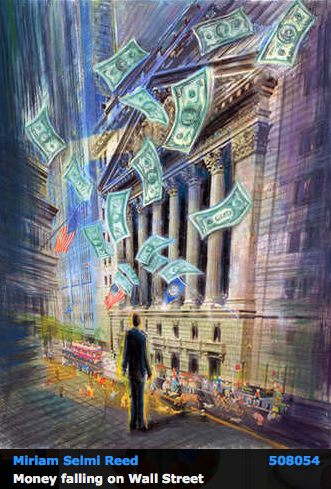
View the artists’s homage on the topic: WALL STREET

Miriam Selmi Reed is represented by Illustration Source, New York City. Portfolio and contact: Illustration Source NYC

Illustration technique: watercolor, acrylic and pencil combined with digital mixed media using Adobe Photoshop and Illustrator.Copyright by Illustration Source, New York City.

Illustrations-Technik: Aquarell, Acryl mit Farbstift, gemischt mit Adobe Photoshop und Illustrator. Copyright by Illustration Source, New York City.

divider

Your source for commissioned illustration: ORIGINAL ART STUDIOS in New York City.

OAS

Portfolio Original Art Studios, New York City: MIRIAM SELMI REED

RUN ZIGGY RUN – Happy Holidays everyone!

Our bilingual RUN ZIGGY RUN Book; the perfect gift for kids / With this ZIGGY book you support an animal in need. Thank you!
Unser zweisprachiges RUN ZIGGY RUN Buch; Das perfekte Geschenk für Kinder / mit diesem ZIGGY Buch unterstützt du ein Tier in Not. Danke!

Store in Germany: RUN ZIGGY RUN – HUGENDUBEL Germany

Store in Switzerland: RUN ZIGGY RUN – EXLIBRIS, Switzerland

Secure store with international shipping: RUN ZIGGY RUN – International Store

z-dog_animation1

RUN ZIGGY RUN
Bilingual German/English ZIGGY books are 2 language Turn-2-Learn reading adventures for kids 3 to 8 years old!
36 pages in color, 6.75 x 6,75″ / REEDAROUND Books, ISBN: 978-3-9524704-0-4

Zweisprachige Deutsch/Englisch ZIGGY-Bücher sind ein Drehen-zum-Lernen Abenteuer für Kinder von 3 bis 8 Jahre alt! 36 Seiten in Farbe, 17 x 17 cm / ISBN: 978-3-9524704-0-4

runziggyrun-small1

NEWS: RUN ZIGGY RUN books for sale at the children’s book store in Zurich, Switzerland, Oberdorfstrasse 32! and the Scheidegger Bookstore in Affoltern am Albis.

kinderbuchladen

ZIGGY’s BLOG: with films, animations and more: Have fun!

Social Media!

divider

English version:
Photoshop Tip: I always have to scale the size of my images with Adobe Photoshop. Here I show the steps of my job; how to prepare my illustration at a 300 dpi resolution, 7 inches wide for Adobe InDesign. I go to MENU > IMAGE > IMAGE SIZE and follow this steps: How to reduce or enlarge a Photoshop file without loosing quality.

Deutsche Version:
Photoshop Tipp: Ich muss immer wieder meine Bilder mit Adobe Photoshop skalieren. Hier zeige ich die Arbeitsschritte; wie ich meine Illustration auf 300 dpi ändere und als 15 cm breites Bild für Adobe InDesign vorbereite. Ich gehe zu MENÜ > BILD > BILDGRÖSSE und befolge diese Arbeitsschritte: Wie man ein Bild in Photoshop ohne Qualitätsverlust vergrössert oder verkleinert.

divider

Courtesy of Illustration Source

Courtesy of Illustration Source

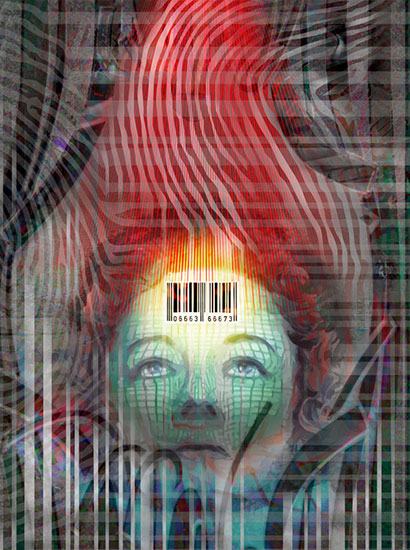
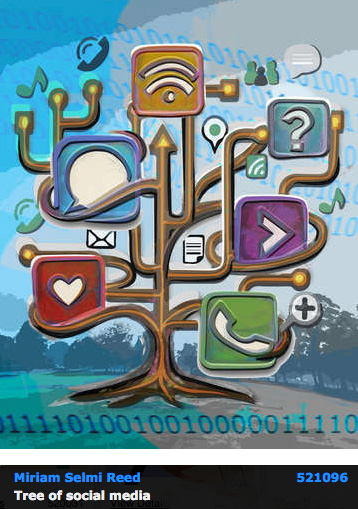
View the artists’s homage on the topic: DATA SECURITY and SOCIAL MEDIA

Miriam Selmi Reed is represented by Illustration Source, New York City. Portfolio and contact: Illustration Source NYC

Illustration technique: watercolor, acrylic and pencil combined with digital mixed media using Adobe Photoshop and Illustrator.Copyright by Illustration Source, New York City.

Illustrations-Technik: Aquarell, Acryl mit Farbstift, gemischt mit Adobe Photoshop und Illustrator. Copyright by Illustration Source, New York City.

COMMUNICATION & POLITICS

divider

Photoshop Tip: What is the difference between assign a color profile or to convert a color profile? Here it is: Assign / convert a color profile in Adobe Photoshop!
“I personally work in my Photoshop illustration file in Adobe RGB and leave all the layers, masks and paths intact. Once my illustration is done, I flatten the PSD file, get rid off all paths and save it out as a Tiff file. My agent SIS prefers RGB files while my printer wants a CMYK file and he lets me know the preferred color profile his printing press wants. The key to this problem: communicate with your client/printer!”

Deutsche Version
Photoshop Tipp: Was ist der Unterschied zwischen Farbprofil zuweisen oder umwandeln? Hier ist die Anleitung dazu: Wie man Farbprofile umwandelt / zuweist in Adobe Photoshop!
“Ich arbeite gerne “nicht destruktiv” mit Adobe Photoshop und bleibe in Adobe RGB mit allen Ebenen, Masken und Pfade. Wenn meine Illustration fertig ist, reduziere ich meine Datei auf eine Ebene und speichere es als Tiff Datei. Mein Agent SIS möchte RGB files, meine Druckerei möchte aber CMYK files und er lässt es mich wissen, welches Farbprofil ich verwenden soll. Die Lösung zum Problem: kommuniziere mit dem Kunden/Druckerei!”

divider

IMAGE OF TODAY – ILLUSTRATION SOURCE IN NEW YORK CITY:

Courtesy of Illustration Source

Courtesy of Illustration Source

View the artists’s homage on the topic: COMMUNICATION & POLITICS

Miriam Selmi Reed is represented by Illustration Source, New York City. Portfolio and contact: Illustration Source NYC

Illustration technique: watercolor, acrylic and pencil combined with digital mixed media using Adobe Photoshop and Illustrator.Copyright by Illustration Source, New York City.

Illustrations-Technik: Aquarell, Acryl mit Farbstift, gemischt mit Adobe Photoshop und Illustrator. Copyright by Illustration Source, New York City.

divider

Your source for commissioned illustration: ORIGINAL ART STUDIOS in New York City.

OAS

Portfolio Original Art Studios, New York City: MIRIAM SELMI REED
LAB colors / LAB Farben in Photoshop

divider

Deutsche Version siehe unten!
TIP OF THE MONTH:
“How I quickly change my brightness with Adobe Photoshop WITHOUT changing my colors”:

To get the my best result; I change my illustration under IMAGE > MODE to 16 Bit and then go to IMAGE > MODE and select Lab Color.

With this trick I’m able to change the brightness seperately from my colors! Here is the step-by-step guide: How to work with the Lab Color Mode in Photoshop.

lab

Deutsche Version
TIPP DES MONATS:
“Wie ich die Helligkeit mit Adobe Photoshop anpasse OHNE meine Farben zu verändern”:

Um mein bestes Resultat zu erreichen, ändere ich meine Illustration unter BILD > MODUS auf 16 Bit, gehe dann zu BILD > MODUS > und wähle den Modus Lab-Farbe.

Mit diesem Trick kann ich meine Helligkeiten separat von den Farben ändern! Hier ist ist alles im Detail erklärt: Wie man mit dem Lab-Farbe-Modus in Photoshop arbeitet.

Courtesy of Illustration Source

Courtesy of Illustration Source

View the artists’s homage on the topic: THE GRADUATE

Miriam Selmi Reed is represented by Illustration Source, New York City. Portfolio and contact: Illustration Source NYC

Illustration technique: watercolor, acrylic and pencil combined with digital mixed media using Adobe Photoshop and Illustrator.Copyright by Illustration Source, New York City.

Illustrations-Technik: Aquarell, Acryl mit Farbstift, gemischt mit Adobe Photoshop und Illustrator. Copyright by Illustration Source, New York City.

Work smart!

divider

Deutsche Version siehe unten!
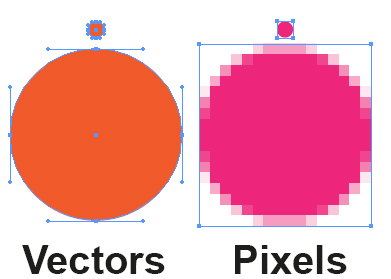
Photoshop Tip: I love to mix Photoshop and Illustrator, as shown on my Illustration below. I copy my Illustrator drawing and place it as a SMART OBJECT into my Photoshop file. With this method, I can work non-destructive and make as many changes as I wish. It shows an interesting mixture between pixels and sharp vector outlines!
More on this topic: How to use SMART OBJECTS

VectorE

Deutsche Version
Photoshop Tipp: Ich mische gerne Photoshop and Illustrator, wie man unten bei meiner Illustration sieht. Ich kopiere meine Illustrator Zeichnung und platziere es als SMART OBJEKT in meine Photoshop Datei. Mit dieser Methode, kann ich nicht-destruktive arbeiten und so viele Änderungen machen wie ich will. Zudem zeigt es eine interessante Mischung zwischen Pixel und harten Vektor Linien.
Mehr über dieses Thema: Wie man SMART OBJEKTE benutzt

divider

Courtesy of Illustration Source

Courtesy of Illustration Source

View the artists’s homage on the topic: THE GRADUATE

Miriam Selmi Reed is represented by Illustration Source, New York City. Portfolio and contact: Illustration Source NYC

Illustration technique: watercolor, acrylic and pencil combined with digital mixed media using Adobe Photoshop and Illustrator.Copyright by Illustration Source, New York City.

Illustrations-Technik: Aquarell, Acryl mit Farbstift, gemischt mit Adobe Photoshop und Illustrator. Copyright by Illustration Source, New York City.

divider

Your source for commissioned illustration: ORIGINAL ART STUDIOS in New York City.

OAS

Portfolio Original Art Studios, New York City: MIRIAM SELMI REED
Illustrator brushes / Pinsel

English:
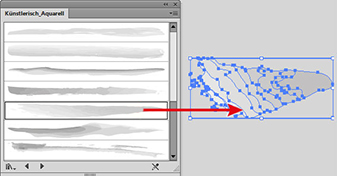
How I make my own brushes in Illustrator: The brushes used in the illustration below are part of the “Artistic Watercolor Brushes” found under MENU > WINDOW > BRUSHES > Library. I drag the brush I like out of the Library on to the drawing board.

artisticbrush

Then I make changes to the brush and drag it into my regular Brushes-Window . There are 3 different brush-options, I prefer the Art Brush myself. Then I select the box the “Colorization Method > Tints”, so I can color my brush stroke later on.

newbrush

divider

Our new i-adobe book is available online – in English – Preview & download here!

Unser neues i-adobe book ist erhältlich online – in Deutsch – Vorschau & Download hier!

divider

Deutsch:
Wie ich meine eigenen Pinsel in Illustrator erstelle: Ich benutze meistens einen bestehenden Pinsel unter MENÜ > FENSTER > PINSEL. Die Pinsel die ich unten bei meiner Illustration benutzte, sind Teil der “Künstlerisch Aquarell Palette” in der Pinselbibliothek. Ich ziehe einen Pinsel der mir gefällt aus der Pinsel-Bibliothek auf die Zeichenfläche.

kuenstlerisch

Dann verändere ich den Pinselstrich so wie ich ihn haben möchte und ziehe ihn in mein normales Pinselbedienfeld . Es gibt 3 verschiedene Pinsel-optionen die man ausprobieren sollte. Ich ziehe den Bildpinsel vor. Wichtig ist einzig die Option Methode “Einfärben > Farbtöne” anzuwählen, damit ich den Pinsel auch später nach Bedarf anders einfärben kann.

neuerpinsel

divider


Miriam Selmi Reed is represented and licensed by Illustration Source - Courtesy of Illustration Source

Miriam Selmi Reed is represented and licensed by Illustration Source – Courtesy of Illustration Source

View the artists’s homage on the topic: TAKE FLIGHT

Miriam Selmi Reed is represented by Illustration Source, New York City. Portfolio and contact: Illustration Source NYC

Illustration technique: watercolor, acrylic and pencil combined with digital mixed media using Adobe Photoshop and Illustrator.Copyright by Illustration Source, New York City.

Illustrations-Technik: Aquarell, Acryl mit Farbstift, gemischt mit Adobe Photoshop und Illustrator. Copyright by Illustration Source, New York City.

Photoshop: Retouch Layer / Retuschen-Ebene

English:
How I retouch my illustrations in a “non-destructive” way: When using the Stamp- and Healing Brush Tools in Photoshop CC or CS6, I place an empty layer on top – while selecting the option ALL LAYERS in the Control Bar – then I click the ALT key to sample and start stamping. When I make a mistake, I select the empty retouch-layer and use the Eraser Tool to delete it. With this “non-destructive” method my artwork won’t be harmed.


stamp

Deutsch:
Wie ich meine Illustrationen “nicht-destruktiv” retuschiere: Ich benutze das Stempel-Werkzeug oder den Reparaturpinsel. Ich erstelle eine leere Ebene die ich ganz oben einfüge. Dann drücke ich die ALT Taste um einen sauberen Bereich aufzunehmen – mit der Option ALLE EBENEN (=All Layers) aufnehmen oben in der Steuerung – und stemple vor mich hin. Sollte ich einen Fehler machen, benutze ich das Radiergummi-Werkzeug und lösche ihn. Damit arbeite ich “nicht-destruktiv” und meine Illustration ist dadurch geschützt.


Photoshop Stamp-Tool / Stempel-Werkzeug

Photoshop Stamp-Tool / Stempel-Werkzeug


Miriam Selmi Reed is represented and licensed by Illustration Source - Courtesy of Illustration Source

Miriam Selmi Reed is represented and licensed by Illustration Source – Courtesy of Illustration Source


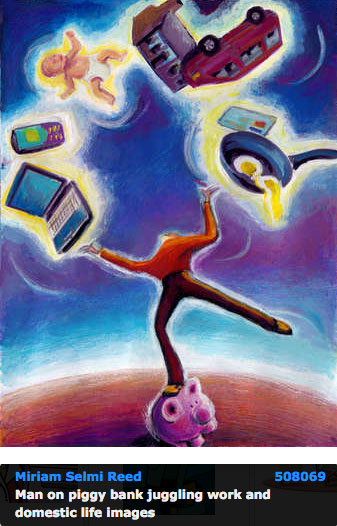
View the artists’s homage on the topic: PARENTHOOD TODAY

Miriam Selmi Reed is represented by Illustration Source, New York City. Portfolio and contact: Illustration Source NYC

Illustration technique: watercolor, acrylic and pencil combined with digital mixed media using Adobe Photoshop and Illustrator.Copyright by Illustration Source, New York City.

Illustrations-Technik: Aquarell, Acryl mit Farbstift, gemischt mit Adobe Photoshop und Illustrator. Copyright by Illustration Source, New York City.

NEW: 123 i-Adobe eBook / PDF

ENGLISH:

While there are many online tutorials and step-by-step courses already available, we have chosen to simply provide solutions for some of the most commonly asked questions we’ve encountered:

Preview & download at: 123 i-adobe Book in ENGLISH

i-Adobe interactive book / Cover illustration: Michael Alan Reed

i-Adobe interactive book / Cover illustration: Michael Alan Reed

DEUTSCH:

Es gibt bereits viele Tutorials und Kurse online, daher haben wir uns entschlossen einfache Lösungen für typische Adobe Anwendungsprobleme zu publizieren:

Vorschau & Download: 123 i-adobe Buch in DEUTSCH

Vectorise your photo / Foto in Vektoren umwandeln

Tutorial in English and German / Anleitung in Deutsch und Englisch

Deutsche Version siehe unten!

English version:

Would you like to receive our tips for free in your e-mail box? Simply select FOLLOW to sign up with your e-mail address.

divider

TIP OF THE WEEK: How to colorize a vectorized photo!
How to use the image trace option in Illustrator CS6 or CC, to vectorize and colorize a Photo – Bilingual instructions in English and German subtitles.

Step 1: Place your photo into Illustrator.
Step 2: Vectorise your photo > Window > Image Trace.
Step 3: Don’t forget to click on the button “EXPAND”.
Step 4: Edit your colors > Edit > Edit Colors.

Tutorial:

divider

Deutsche Version

Möchten Sie unsere gratis Tipps im e-mail erhalten? Schreiben Sie sich unter FOLLOW mit Ihrer e-mail Adresse ein.

TIPP DER WOCHE: Wie ein vektorisiertes Bild einfärbt

Tutorial: Wie man mit dem Bildnachzeichner in Illustrator CS6 oder CC arbeitet, damit ein Foto vektorisiert und einfärbt. Zweisprachige Anleitung in Englisch mit deutschen Untertiteln.

1: Platzieren Sie Ihr Bild in Illustrator.
2: Vektorisieren Sie Ihr Photo > Fenster > Bildnachzeichner.
3: Vergessen Sie nicht auf “UMWANDELN” zu klicken.
4: Färben Sie Ihr Vektorbild ein unter > Bearbeiten > Farben bearbeiten.

Tutorial auf Englisch mit deutschen Untertiteln:

divider
Illustration technique: watercolor, acrylic and pencil combined with digital mixed media using Adobe Photoshop and Illustrator.Copyright by Illustration Source, New York City.

Illustrations-Technik: Aquarell, Acryl mit Farbstift, gemischt mit Adobe Photoshop und Illustrator. Copyright by Illustration Source, New York City.

Courtesy of Illustration Source

Courtesy of Illustration Source

View the artists’s homage on the topic: GOVERNMENT

Miriam Selmi Reed is represented by Illustration Source, New York City. Portfolio and contact: Illustration Source NYC

Your source for commissioned illustration: ORIGINAL ART STUDIOS in New York City.

OAS

Portfolio Original Art Studios, New York City: MIRIAM SELMI REED

How to quickly change brush sizes in Photoshop

With courtesy of Illustrationsource in New York City - www.illustrationsource.com

With courtesy of Illustrationsource in New York City – http://www.illustrationsource.com

Miriam Selmi Reed is represented by Illustration Source, New York City. Portfolio and contact: Illustration Source NYC

divider

TIP OF THE WEEK:
“How I quickly change my brush sizes in Photoshop”
With a painting tool selected, Control + Option (Mac) – drag left/right in order to decrease/ increase brush size. Control + Option (Mac) – drag up/down to decrease/ increase brush hardness. Since I’m using a German keyboard; I have to press the ctrl & alt keys on my Mac…

On Windows: Alt + Right Mouse – drag left/right to decrease/increase brush size and up/down to decrease/ increase brush hardness.

brush

TIPP DER WOCHE:
“So verändere ich meine Pinselgrössen in Photoshop super schnell”
Wählen Sie Ihr Pinselwerkzeug, drücken Sie auf die ctrl & alt Tasten (Mac) – klicken & ziehen Sie nach links/rechts um die Pinselgrösse zu verkleinern/vergrössern. Ctrl + alt (Mac) – klicken & ziehen Sie nach oben/unten um die Härte zu reduzieren/verstärken.

Bei Windows: Alt Taste + rechter Mausklick – klicken & ziehen Sie nach links/rechts um den Pinsel zu verkleinern/vergrössern und nach oben/unten um die Härte zu reduzieren/verstärken.

divider

Miriam Selmi Reed is represented and licensed by Illustration Source - Courtesy of Illustration Source

Miriam Selmi Reed is represented and licensed by Illustration Source – Courtesy of Illustration Source

View the artists’s homage on the topic: TAX TIME

Miriam Selmi Reed is represented by Illustration Source, New York City. Portfolio and contact: Illustration Source NYC

Illustration technique: watercolor, acrylic and pencil combined with digital mixed media using Adobe Photoshop and Illustrator.Copyright by Illustration Source, New York City.

Illustrations-Technik: Aquarell, Acryl mit Farbstift, gemischt mit Adobe Photoshop und Illustrator. Copyright by Illustration Source, New York City.

divider

Your source for commissioned illustration: ORIGINAL ART STUDIOS in New York City.

OAS

Portfolio Original Art Studios, New York City: MIRIAM SELMI REED

Invitation / Einladung Art Show in Zurich, Switzerland

Vernissage_Facebook

Art Exhibition in Zurich, Switzerland – from 19.2. – 11.3.2016
Vernissage / Opening reception: Friday 19.2.16 starts at 6pm (18 Uhr) – GALERIE 16b, Ausstellungsstrasse 16, 8005 Zürich – (hinter dem HB Zürich) Finissage with concert: Friday 11.3.16 starts at 6pm (18 Uhr) – Gallery opening hours: WE to SA from 5 to 8pm. (Öffnungszeiten: MI bis SA von 17 bis 20 Uhr)

BLOG / Info: Fine Art / Illustrations by Miriam Selmi Reed

Programs used out of the Adobe Creative Cloud: Adobe Photoshop, After Effects, Audition, Illustrator and Apple Logic Pro

Fine Art & Footage: Miriam Selmi Reed
Music composed, played and arranged by Michael Alan Reed
Copyright 2015 – www.REEDesign.ch – all rights reserved

Todays topic: COMMUNITY

Deutsche Version siehe unten!
divider

English version:

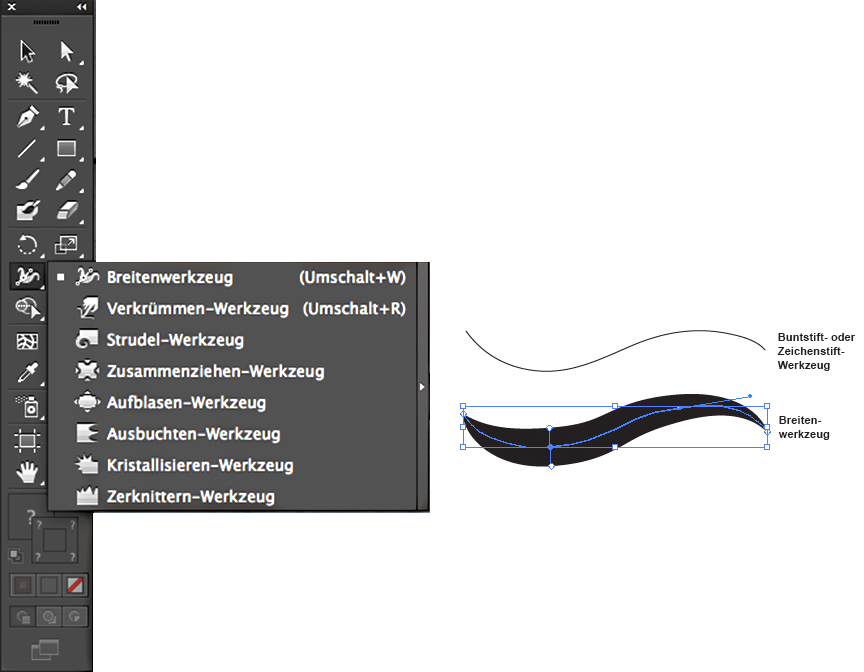
Illustrator Tipp > WIDTH TOOL: When I’m using any lines as shown on my Illustration below, I usually use the Width Tool. The Width Tool in Adobe Illustrator is ideal to give your lines character: select the line and drag with the mouse to define the width of your choice.

widthtool

divider

Deutsche Version:

Illustrator Tip > BREITEN-WERKZEUG: Wenn ich bei meinen Illustrationen (siehe unten) verschiedene Linienstärken benutze, dann benutze ich das Breiten-Werkzeug. Das Breitenwerkzeug in Adobe Illustrator ist ideal um einer simplen Linie einen Pinsel-Charakter zu geben: die Linie anklicken und mit der Maus ZIEHEN bis die Linie breiter wird.

breitenwerkzeugtool

divider

Miriam Selmi Reed represented and licensed by Illustration Source - Courtesy of Illustration Source

Miriam Selmi Reed represented and licensed by Illustration Source – Courtesy of Illustration Source

View the artists’s homage on the topic: COMMUNITY

Miriam Selmi Reed is represented by Illustration Source, New York City. Portfolio and contact: Illustration Source NYC

Illustration technique: watercolor, acrylic and pencil combined with digital mixed media using Adobe Photoshop and Illustrator.Copyright by Illustration Source, New York City.

Illustrations-Technik: Aquarell, Acryl mit Farbstift, gemischt mit Adobe Photoshop und Illustrator. Copyright by Illustration Source, New York City.

divider

Your source for commissioned illustration: ORIGINAL ART STUDIOS in New York City.

OAS

Portfolio Original Art Studios, New York City: MIRIAM SELMI REED

Animate with Photoshop in 2016

The following illustration was created by Mimi Selmi Reed (webdesign: Adobe Muse) with pencils and water color – traced and executed in Illustrator & Photoshop – animated in Adobe Photoshop CC.
(Tutorial see below / Anleitung siehe unten)

Copyright by Miriam Selmi Reed - member SCBWI - all rights reserved.

Copyright by Miriam Selmi Reed – member SCBWI – all rights reserved.

Every Follower, Like and comment is welcome! More comics & cartoons at: Z-DOG COMIC

divider

ENGLISH:
Animations with Photoshop / Animationen mit Photoshop:
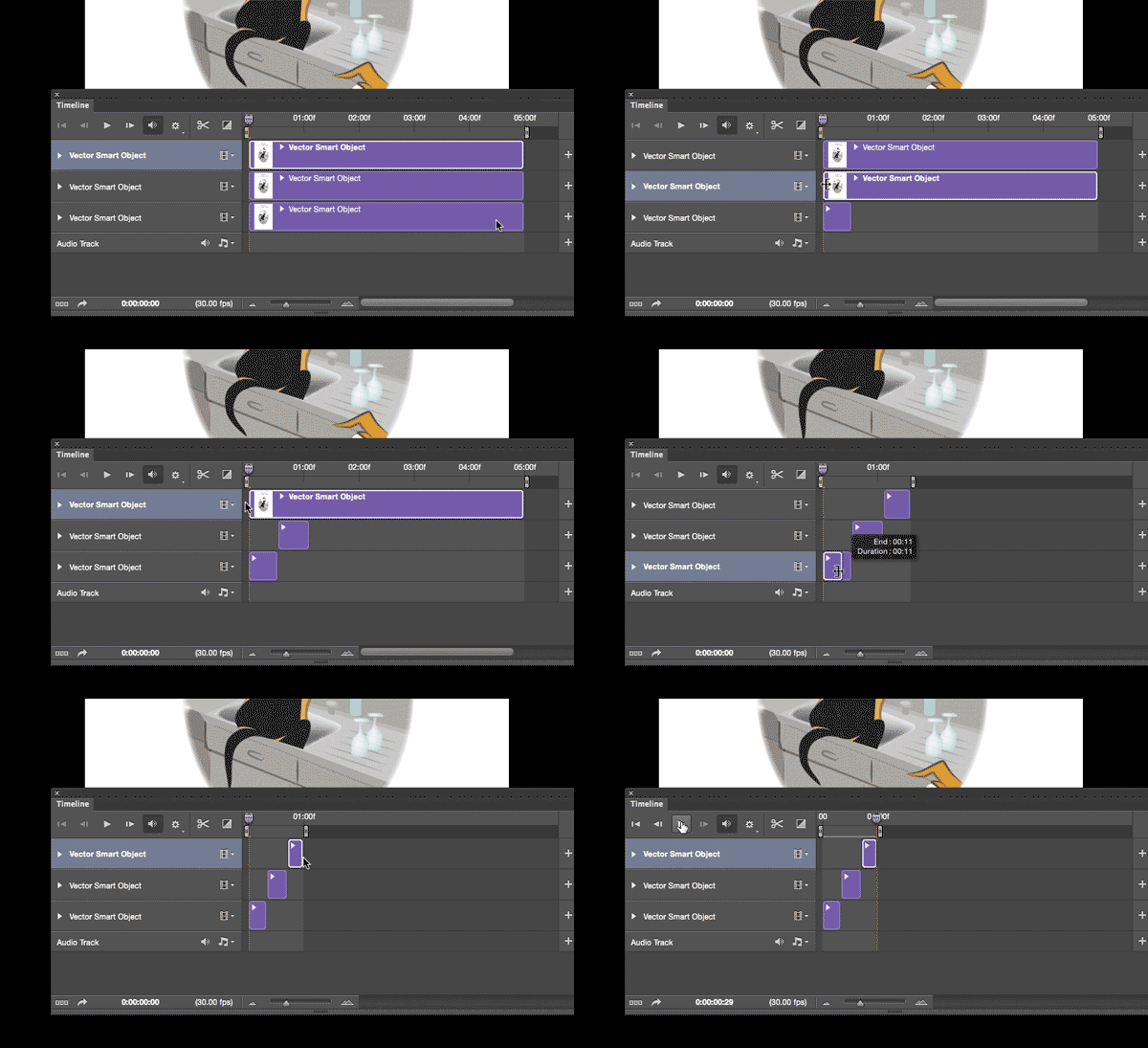
Photoshop timeline for animations is under Window > Timeline. Have fun!
How to create frame animations in Photoshop

DEUTSCH:
Die Photoshop-Zeitleiste für Animationen kann man unter Fenster > Zeitleiste finden. Viel Spass!
Erstellen von Frame-Animationen in Photoshop

animation

Topic of the week: Consumerism

divider

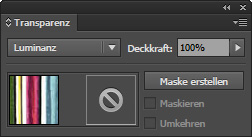
Illustrator Tipp > TRANSPARENCY: I love to use Transparencies in Adobe Illustrator, as shown on my Illustration below. I first go under MENU > WINDOW < TRANSPARENCY; and select a Transparency for my selected object. With this method, I can apply different transparencies and work non-destructive.

transparency

divider

Illustrator Tip > TRANSPARENZ: Ich benutze gerne die Transparenzen in Illustrator – wie bei meiner Illustration unten. Dazu gehe ich unter MENU > FENSTER > TRANSPARENZ; und wähle eine Transparenz nach Wahl. Mit dieser Methode arbeite ich nicht-Destruktiv, und kann somit jederzeit eine Transparenz löschen oder nach Wunsch verändern.

transparenz

divider

Miriam Selmi Reed represented and licensed by Illustration Source - Courtesy of Illustration Source

Miriam Selmi Reed represented and licensed by Illustration Source – Courtesy of Illustration Source

View the artists’s homage on the topic: CONSUMERISM

Miriam Selmi Reed is represented by Illustration Source, New York City. Portfolio and contact: Illustration Source NYC

Illustration technique: watercolor, acrylic and pencil combined with digital mixed media using Adobe Photoshop and Illustrator.Copyright by Illustration Source, New York City.

Illustrations-Technik: Aquarell, Acryl mit Farbstift, gemischt mit Adobe Photoshop und Illustrator. Copyright by Illustration Source, New York City.

divider

Your source for commissioned illustration: ORIGINAL ART STUDIOS in New York City.

OAS

Portfolio Original Art Studios, New York City: MIRIAM SELMI REED

Today’s Topic: TRANSPARENCY

divider

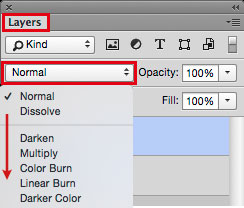
Photoshop Tipp > BLENDING MODE: I love to use Blending Modes in my layers, as shown on my Illustration below. I first go under MENU > LAYERS > and select a different Blending Mode for the layer. With this method, I can apply different transparencies to my layers and work non-destructive.

Blendingmode

divider

Photoshop Tip > MISCHMODUS: Ich benutze gerne den Mischmodus in Photoshop – wie bei meiner Illustration unten. Dazu gehe ich unter MENU > EBENEN > und stelle einen anderen Mischmodus für die Ebene ein. Mit dieser Methode arbeite ich nicht-Destruktiv, und kann somit jederzeit eine Transparenz löschen oder nach Wunsch verändern.

Mischmodus

divider

Miriam Selmi Reed represented and licensed by Illustration Source - Courtesy of Illustration Source

Miriam Selmi Reed represented and licensed by Illustration Source – Courtesy of Illustration Source

View the artists’s homage on the topic: TRANSPARENCY

Miriam Selmi Reed is represented by Illustration Source, New York City. Portfolio and contact: Illustration Source NYC

Illustration technique: watercolor, acrylic and pencil combined with digital mixed media using Adobe Photoshop and Illustrator.Copyright by Illustration Source, New York City.

Illustrations-Technik: Aquarell, Acryl mit Farbstift, gemischt mit Adobe Photoshop und Illustrator. Copyright by Illustration Source, New York City.

divider

Your source for commissioned illustration: ORIGINAL ART STUDIOS in New York City.

OAS

Portfolio Original Art Studios, New York City: MIRIAM SELMI REED

Todays topic: PATHWAYS

divider

Photoshop Tipp > SMART FILTERS: When I’m using Filters as shown on my Illustration below, I first go under MENU > FILTER > Convert for Smart Filter. With this method, I can apply every filter and work non-destructive. I open my layers and click on my Filter icon which opens the previous chosen filter settings so I can make my adjustments.

smart-filters

Photoshop Tip > SMART FILTER: Wenn ich in Photoshop Filter benutze – siehe unten – dann gehe ich unter MENU > FILTER > Konvertieren für Smart Filter. Mit dieser Methode arbeite ich nicht-Destruktiv, und kann somit jeden Filter löschen oder nach Wunsch verändern. Dazu öffne ich mein Ebenen-Bedienfeld und klicke auf meinen Filter, damit sich der vorher gewählte Filter wieder öffnet und ich Änderungen vornehmen kann.

divider

Miriam Selmi Reed represented and licensed by Illustration Source - Courtesy of Illustration Source

Miriam Selmi Reed represented and licensed by Illustration Source – Courtesy of Illustration Source

View the artists’s homage on the topic: PATHWAYS

Miriam Selmi Reed is represented by Illustration Source, New York City. Portfolio and contact: Illustration Source NYC

Illustration technique: watercolor, acrylic and pencil combined with digital mixed media using Adobe Photoshop and Illustrator.Copyright by Illustration Source, New York City.

Illustrations-Technik: Aquarell, Acryl mit Farbstift, gemischt mit Adobe Photoshop und Illustrator. Copyright by Illustration Source, New York City.

divider

Your source for commissioned illustration: ORIGINAL ART STUDIOS in New York City.

OAS

Portfolio Original Art Studios, New York City: MIRIAM SELMI REED